Jewelry photography guide
Focus Stacking for Jewelry Photography: Full Guide
Photograph a ring with a macro lens and you run into a wall almost immediately: the front of the band is sharp, the stone is soft, and the back of the band is a blur. Stopping down helps a little and then makes everything softer. Focus stacking is the professional solution. You capture a series of frames, each focused a little further into the piece, and merge the sharp parts of every frame into one image that is sharp from front to back. This guide explains why the problem exists, how to capture a clean stack, and how to merge it.
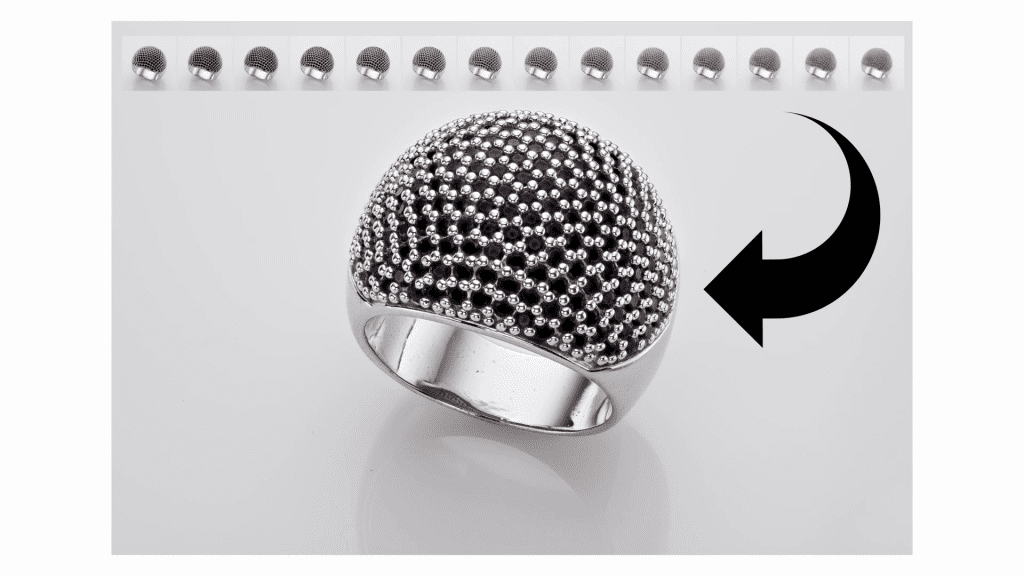
Why depth of field runs out at macro distances
Depth of field depends on magnification. At normal distances, f/11 keeps a whole product in focus. At life-size macro magnification, f/11 gives you a slice only a few millimeters deep. A ring is 20 millimeters or more from front to back; a bracelet or necklace laid on a surface can be much more.
The obvious fix, a very small aperture, trades one problem for another. Beyond roughly f/11 on a full-frame camera (and earlier on smaller sensors) diffraction starts to soften the entire image, so f/22 or f/32 gives more depth but less detail everywhere, which is the opposite of what a jewelry image needs. Focus stacking removes the trade-off: each frame is shot at the lens’s sharpest aperture, and depth comes from the number of frames rather than from the aperture.
What you need
- A camera on a solid tripod, with the piece and the lights locked in place. Nothing may move between frames.
- A macro lens, or a lens that reaches the magnification the piece needs.
- Tethered shooting to a computer, so you can see focus at full size and, ideally, drive the focus from the software.
- A remote trigger or the tethering software, so the camera is never touched.
- Continuous light or flash with consistent output. Variation in brightness between frames causes artifacts in the merge.
- Stacking software: Helicon Focus is the standard in product and jewelry work; Photoshop’s Auto-Align and Auto-Blend Layers also work for simpler stacks.
Capturing the stack
- Set up the lighting and composition completely first. Stacking does not fix light; it only extends focus.
- Switch to manual focus, manual exposure and a fixed white balance. Any automatic setting that can change between frames must be off.
- Choose the aperture for sharpness, typically f/8 to f/11 on full frame, and set ISO to base.
- Focus on the nearest point of the piece you want sharp. Take the first frame.
- Move focus a small step further into the piece and take the next frame. The step must be smaller than the depth of field of a single frame so the sharp zones overlap. At high magnification this can mean 20 to 60 frames for a ring.
- Continue until the farthest point is sharp. Take one or two frames beyond it as a margin.
Two ways to move focus
Focus-ring stepping uses the camera or tethering software to turn the lens focus in equal increments; many modern mirrorless bodies offer automated focus bracketing that does this in one command. Rail stepping keeps the lens focus fixed and moves the whole camera forward on a macro rail in equal increments. Rail stepping preserves magnification more consistently and is the traditional approach for high-magnification work; focus-ring stepping is faster and is adequate for most jewelry at moderate magnification.
Watch it done
Jewelry Photography 101: Focus Stacking is a free tutorial from Ivan Moshe’s YouTube channel that walks through a stack on a real piece, from the first frame to the merged result.
Merging the stack
In Helicon Focus the frames are loaded in order and rendered with one of its methods. Method B (depth map) produces smooth results on most jewelry; Method C (pyramid) handles overlapping edges and fine detail such as prongs and chain links better, at the cost of occasional halo artifacts. The usual practice is to render both and compare.
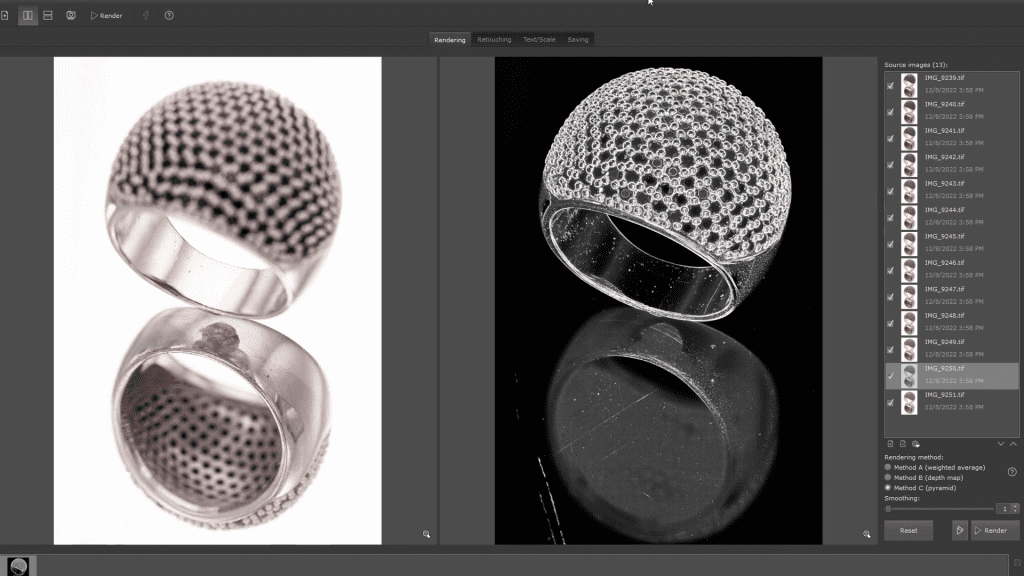
In Photoshop, the frames are loaded as layers, aligned with Auto-Align Layers, and merged with Auto-Blend Layers set to Stack Images. The result is acceptable for simple pieces but is slower and less controllable on complex ones.
After the merge, the stacked image goes into the normal retouching workflow: cleaning dust, refining metal gradients, enhancing facets and the rest. Stacking artifacts (soft halos around edges where frames disagreed, or a ghosted edge where something moved) are retouched by hand at this stage, often by painting back a region from a single source frame.
Typical problems and their causes
- Soft bands across the piece: the focus step was too large, so the sharp zones did not overlap. Reshoot with smaller steps.
- Halos around prongs or chain links: the merge method struggled with overlapping edges. Try the pyramid method, or retouch from a source frame.
- Ghosted or doubled edges: something moved during the capture, usually the camera touched, the floor vibrating, or a light drifting. Reshoot.
- Brightness flicker: inconsistent flash output or a continuous light warming up. Let lights stabilize and use a fixed power setting.
- Edges of the frame crop in: as focus moves, magnification changes slightly, and the software aligns by scaling. Leave margin around the piece in the composition.
When not to stack
Stacking is for static subjects and fixed cameras. It is not needed when the piece is small relative to the frame and the depth of field of one frame already covers it, and it is not possible when something is in motion. For lifestyle images with a deliberately shallow look, a single frame is the right choice. For catalog, e-commerce and advertising images of jewelry, where every part of the piece must be sharp, stacking is standard practice.
See it done, for free
The free sample lesson from Mastering Jewelry Photography is this exact topic: lesson 5 of the practical chapter, Focus Stacking (9 minutes 17 seconds), in which Ivan Moshe shows how focus stacking keeps a whole jewelry piece sharp from front to back. The course also has a dedicated Helicon Focus lesson in its software chapter.
The full course covers the whole workflow around it: lenses and cameras for jewelry, lighting theory and practice, tethered shooting, Helicon Focus, photographing rings, bracelets, earrings and necklaces, and about two and a half hours of Photoshop retouching on real pieces. 49 lessons, 12 chapters, 6 hours 15 minutes of video, one-time payment, lifetime access.
Related guides
- How to Photograph Rings: lighting, focus and composition
- Choosing a Lens for Jewelry Photography: macro, focal length and sharpness
- Camera Settings for Jewelry Photography: sharpness and exposure
- Tethered Shooting for Jewelry Photography: a practical workflow
About the author
Ivan Moshe is a commercial photographer and high-end retoucher who has photographed products for the advertising industry for more than 15 years, from his studio in Tel Aviv’s Diamond District. He was selected for Lürzer’s Archive 200 Best Ad Photographers Worldwide in 2021/22 and 2023/24, and he teaches Mastering Jewelry Photography, the online course this guide is drawn from.